In my last post I said we were dropping the WWW from our domain name. I'm happy to report the operation was a complete success... But I did encounter some roadblocks. Blogger used to let you point your blog to a so-called naked domain but at some point they stopped. Try it now and you get the error, "Blogs may not be hosted at naked domains." Obviously, I've figured out a way around that. But the way around that was not so obvious.
It's out of character for Blogger to impose a limit like that on blog owners. If there's one thing that really stands out it's the freedom you're given to build your brand and identity with a Blogger hosted blog. For example, Blogger won't penalize me for hiding the navbar. I think it's short-sighted of them to impose a limit on the domain name. Is the domain name not part of the brand? I think it is.
So here's my solution to the "Blogs may not be hosted at naked domains" problem. Read the guide first before following it as it contains differing instructions for 301 and 302 redirects.
1. Back to Blogspot.com
If you're currently publishing to a custom domain switch back to blogspot. The Publishing tab in Blogger's dashboard should read, "You're publishing on blogspot.com".
2. Double-Check or Create the A NAME Records in Your DNS Settings
Have these four A Name Records point to your naked domain.
216.239.32.21
216.239.34.21
216.239.36.21
216.239.38.21
Note: You may use @ for the host name in Go Daddy.
3. Remove the "www" C NAME Record–Or Don't
Chances are you have a C NAME record of www that points to ghs.google.com. If you're planning to 301 redirect your old traffic, delete it. A C NAME record is an alias, it doesn't inherently redirect traffic. Blogger only does 302 redirection and if that's what you want leave the C NAME record as is or add it.
4. Publish Your Naked Domain
Switch to advanced settings for custom domains. Type in your naked domain and this time include a space in front of it. If done correctly the page will reload and tell you, "Settings Were Saved Successfully." Also the space in front of the domain name will be gone.
5. Decision Time: 301 and 302 Redirection
Check the box where it says, "Redirect www.example.com to example.com" if you want 302 redirection. For 301 redirection go to your registrar and follow their instructions for subdomain forwarding. Again, if there's a www C NAME record pointing to ghs.google.com you must delete it for 301 to work properly!
6. Double-Check Your Work
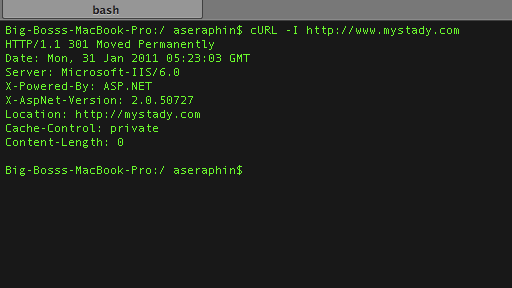
Go Daddy's web tools and wizards are a little buggy. Even though I wanted a 301 redirect it gave me a 302. I was able to check for this using a simple command in cURL:
cURL -I http://www.mystady.com
It's nice to see the page redirecting in your browser but your browser isn't going to tell you what kind of redirect it was. Well, not without some add-ons. But who needs add-ons when you've got cURL?
I hope you've found this guide helpful. As always, your questions and comments are welcome.


23 Comments
http://examalert.careercare.info
When i tried opening http://www.examalert.careercare.info the result is an error page.
In blogger panel check box reads redirect www.careercare.info to examalert.careercare.info
I dont want ro redirect parent domain to subdomain
but i want to redirect http://www.examalert.careercare.info to http://examalert.careercare.info
Or vice versa. Any suggestion please.
Everything was working fine few days back only today i realized this problem, this raises a question mark in the free blogging service of blogger.
How did you find out about that?
Anyways.....
I create A records to Google IP's for
the root domain
and that works fine.
I'm hung up on the last step....
You said don't have a www CNAME alias pointing to ghs.google.com
but what if you create a CNAME with www pointing back to the root domain
I've read some posts that you can do that but it doesn't seem to be working because I get Google's 404 error page which somehow tells me it is not just a propagation issue (24 hrs now same result)
I'm thinking that when some types www.domainname.com they get redirected to domainname.com but google doesn't like that because they typed www.domainname.com
I don't know???
Only other option in my Registrar's Domain Control panel is create subdomain www.domainname.com pointing to subdirectory which I leave blank which is domainname.com/ (haven't tested that yet)
OR URL fowarding (302 ....don't have GoDaddy wish I knew of Registrar with Free Privacy and Free 301 Redirects)
Sheeesh!! Why doesn't Blogger just make their www to non-www or vice versa redirect permanent??? I mean ...who wants to do this type of redirection as temporary (302)?? What's their logic?
Hey here you go free hosting! Come and get it!! Sorry we're going to make SEO unfriendly from the get go...Ha! Ha!
From reading and reading and experimenting I learned the 301 redirect is really not a DNS function even though it is offered in some Registrars Domain Control panel (GoDaddy, Name Cheap, Moniker....). I was going to transfer domain to GoDaddy but they don't offer
free privacy #$%^&*(
Also CNAME www to non-www (or vice versa) doesn't really to a redirect permanent (301) or temporary (302) so you still have the duplication problem of a www and non-www page with same content.
My Registrar (Netfirms) only has 302 redirect or Url Fowarding (thanks :|) but they do have free privacy and reasonable prices.
So I'm bouncing around reading recent posts on DNS problems with Blogger. Read over and over NiteCruzers post on the issue which perplexes me leaving feeling hopelessly DNS retarded.
Sooo I decide to just start from scratch because info is constantly changing.
First I check the assumption that Blogger's own www to non-www (or vice versa) fowarding was in fact temporary (302) which in tests a year ago it was and in numerous posts out there in blogging land. The redirect works pretty quick once the box is checked and saved and Wa La! I say OK that's nice but let's check with some 301 redirect checkers and be dissapointed again like ....
Then I see Redirect 301 Permanent!!! What??? Noo this must be a mistake!!!
So I check with 2 other 301 redirect checkers and YES!!! in fact Google has made this redirect Permanent!!! Yippy!! Yee Ha Yee Haa Upa Upa Andele! {Speedy Gonzales Impression}...Thank you Google :)
But why didn't you do that in the first place? Like you did with doing 301 redirect for domainname.blogspot.com to www.domainname.com or domainname.com..??
OK now I have to go FIRE and DNS Host....Ha Ha Ha Ha Ha Ha Ha! {Evil Laugh}
I see even though Google Blogger's redirect from www to non-www (or vice versa) does a 301 redirect now as opposed to a 302 redirect (in the past) you still need to do a CNAME alias for www to ghs.google.com
if your A records point non-www domain name (domainname.com) to Bloggers 4 IP addresses.
if your A-records point to the www domain name (www.domain.com) to Bloggers 4 IP addresses you then would have a to do...
CNAME of the root domain (domainname.com) to ghs.google.com
Obviously there is no subdomain such as www to fill in the box to do this so you can try to leave the host box blank, or use @, or type domainname.com, or domainname.com. depending what Registrar you use...
I found this out by accident thinking if I could now use Google's Blogger redirect now I didn't need the CNAME alias to ghs.google.com
Sooo I removed the CNAME alias and recheck 301 redirect checkers and started getting 404 page didn't exist hhhmmm......
So I put the CNAME alias back in then it worked again :)
A little more reading revealed that CNAME aliases are not redirects they just SAY
if someone types http://www.domainname.com (for CNAME www pointing to ghs.google.com) to serve up the content from the primary domain in my case http://domainname.com soooo the result is you have 2 addresses with the same content BUT...
You still need a redirect to the actual typed address or link address (that you may be clicking on) to switch to (if neccessary) the primary address (in my case http://domainname.com) so the result is only having 1 address associated with that content.....sooo all in bound links flow to that 1 single address...therefore SEO friendly :)
Not quite sure why I needed to add back in the CNAME alias of www to ghs.google.com for the whole redirect to work properly. I might have to remove it again and wait 3 days and see what happens to be sure.
I'm thinking though since we are using ghs.google.com as the host server you can't redirect a page (in my case www.domainname.com) unless that page has a connection to Blogger which the CNAME does.
Anyone feel free to rip this theory apart as I am a DNS Retard with a little knowledge now (Dangerous) :)
I followed the link to your blog entry and there's nothing to be gained from doing so. The information is already on this page. Makes me wonder if you even read the blog entry.
Furthermore, your entry is incomplete. It doesn't even cover 301 and 302 redirection, for example. My guide covers everything and every step is explained.
http://www.techsoulz.com/2012/09/fix-blogger-naked-domain-404-error-100.html
100% Working
Without the space it doesn't work. The space disappears after refresh.
That post was baffling. But it looks like your post is telling people to add the www. That totally goes against the point of this exercise! lol
I'm not messing with my settings unless I really really have to. Sorry. :(
I had this working with the www, but it isn't what I wanted and the naked didn't redirect to the www.
I guess I will wait to see if the DNS settings propagate.
Error 12 comes up when the space is entered before the naked domain.
net from PHP. I have always disliked the idea because of the
costs. But he's tryiong none the less. I've been using Movable-type on a variety of websites for about a year and am nervous about switching
to another platform. I have heard excellent things about blogengine.
net. Is there a way I can import all my wordpress posts into
it? Any kind of help would be greatly appreciated!
My page - rheumatoid arthritis symptom checker
Add a Comment